
Story Timeline Template
A free story timeline template for novelists: one row per event with its date, chapter, plot track, and who was there, plus a character age grid and a chapter-order sheet for flashbacks and dual timelines. Copy and paste it, or download it as PDF, Word, or Excel.
Build a timeline — no sign-upA story timeline puts every event in your novel in the order it happens in the story's world, which is often a different order from the chapters. The event timeline in this template gives each event a date, a chapter, a track (main plot, subplot, a character's arc, or backstory), the people present, and what it changes. The anchors list holds the dates everything else is measured from. The character age grid works out how old everyone was at each key event. The chapter-order sheet maps reading order to story order, for flashbacks, multiple points of view, and dual timelines. Every field has an example from one invented fantasy novel, set in the same world as the worldbuilding template.
Or fill it in online, right in LitMemo.
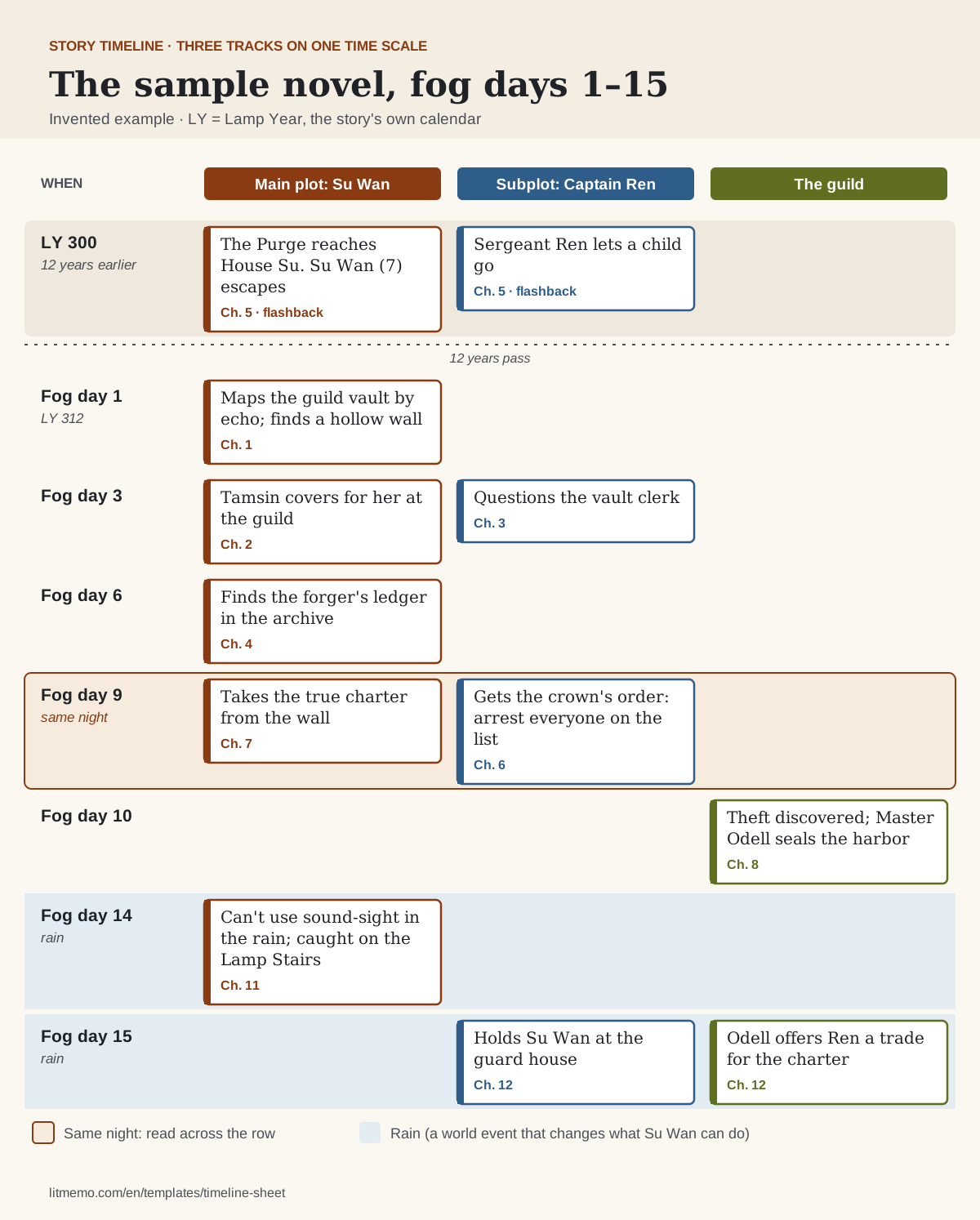
Build a timeline — no sign-upTemplate preview
One event, filled in
| Field | Example |
|---|---|
| Event | The Purge reaches House Su |
| When | LY 300, 7th of Frost-month, night (twelve years before chapter 1) |
| Chapter | Ch. 5, a flashback |
| Track | Backstory |
| Characters | Su Wan (age 7); Ren (29, then a sergeant) |
| Place | The cliff houses above Mist-Veil City |
| What it changes | Ren lets a child escape. She never learns it was him, which pays off in ch. 22 |
Printable blank version
Print the PDF to fill in by hand, or type into the Word or Excel version. All three have the event timeline, a track view with one column per plot thread, the anchors list, the character age grid, and the chapter-order sheet, with an example row in gray in each. The Excel file also opens in Google Sheets and Numbers, where you can sort events by date or filter them by track.
Or fill it in online, right in LitMemo.
Build a timeline — no sign-upField guide
The preview above is one row of the event timeline. Below are all four parts: the event timeline, the anchors every other date hangs from, the character age grid, and the chapter order. Each field says what goes there and shows it filled in for the sample novel: Su Wan, the last of a purged noble house, and Captain Ren, the guard captain hunting the people on the crown's list, in a fog-bound port called Mist-Veil City.
Event timeline: one row per event
| Field | What to write | Example |
|---|---|---|
| Event | What happens, in a few words, written so you can find it again. One row per event, not per chapter: a chapter can hold three events, and one event can span three chapters. | Su Wan takes the true charter from the wall. |
| When (story time) | When it happens in the story's world, in one consistent format: a date, "Day 14," or your invented calendar. Add the time of day when the plot cares about hours. | LY 312, fog day 9, night. (LY = Lamp Year, the invented calendar.) |
| Chapter | Where the reader meets it. Leave it blank for events that happen offstage; they still belong on the timeline. | Ch. 7. (Ren's order, the same evening, is ch. 6.) |
| Track | Which thread it belongs to: main plot, a subplot, one character's arc, or backstory. Tracks are how you see what happens at the same moment. | Main plot. |
| Characters present | Who is there. This is the column you check when you need to know where someone was on a given day. | Su Wan, Tamsin. (Ren is at the guard house, across the city.) |
| Place | Where it happens. Paired with travel times from your worldbuilding sheet, it tells you whether a character could have gotten there. | The guild vault, Mist-Veil City. |
| What it changes | The consequence: what is different afterward, and which later event it sets up. This turns a list of dates into cause and effect. | She's out when the guard comes for her, so she escapes the arrests. The theft is discovered on fog day 10 (ch. 8). |
Anchors: the dates that can't move
| Field | What to write | Example |
|---|---|---|
| Anchor event | An event with a fixed date that other events are measured from: a war, a holiday, a birthday, a season. Five to eight is usually enough for a novel. | The Purge. The first fog day of LY 312. The guild's founding feast. |
| Date | The anchor's date in your story calendar. Everything else can be written as "three days after" an anchor. | The Purge: LY 300, 7th of Frost-month. |
| Why it can't move | What depends on it. If nothing does, it isn't an anchor. | Su Wan's age, Ren's rank, and the twelve years everyone mentions all count from it. |
Character timeline: the age grid
| Field | What to write | Example |
|---|---|---|
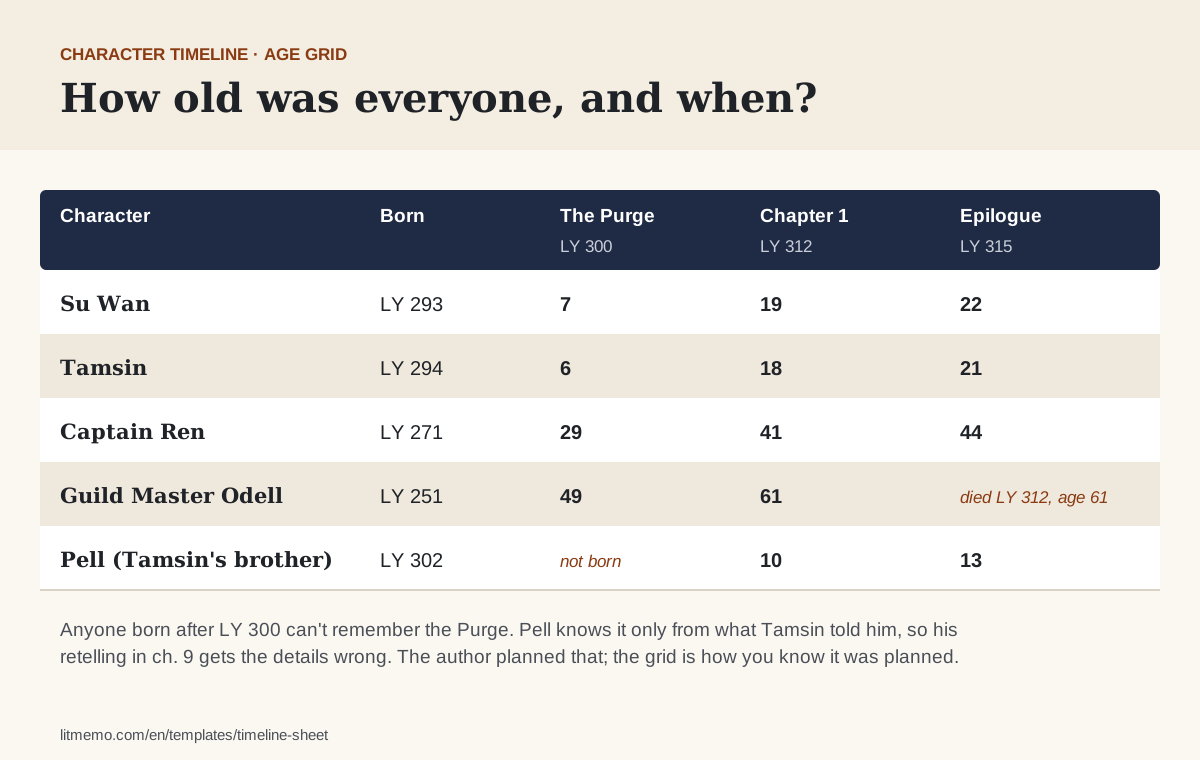
| Born | Year of birth (or the year the character arrives, for immortals and robots). Write it once; compute every age from it. | Su Wan: LY 293. Captain Ren: LY 271. |
| Age at each anchor | One column per anchor event. This is the grid that catches the 30-year-old who was somehow a teenager during a war fifteen years ago. | Su Wan at the Purge: 7. At the story's opening: 19. |
Chapter order
| Field | What to write | Example |
|---|---|---|
| Chapter and POV | Every chapter in reading order, with whose point of view it's in. | Ch. 6, Ren. Ch. 7, Su Wan. |
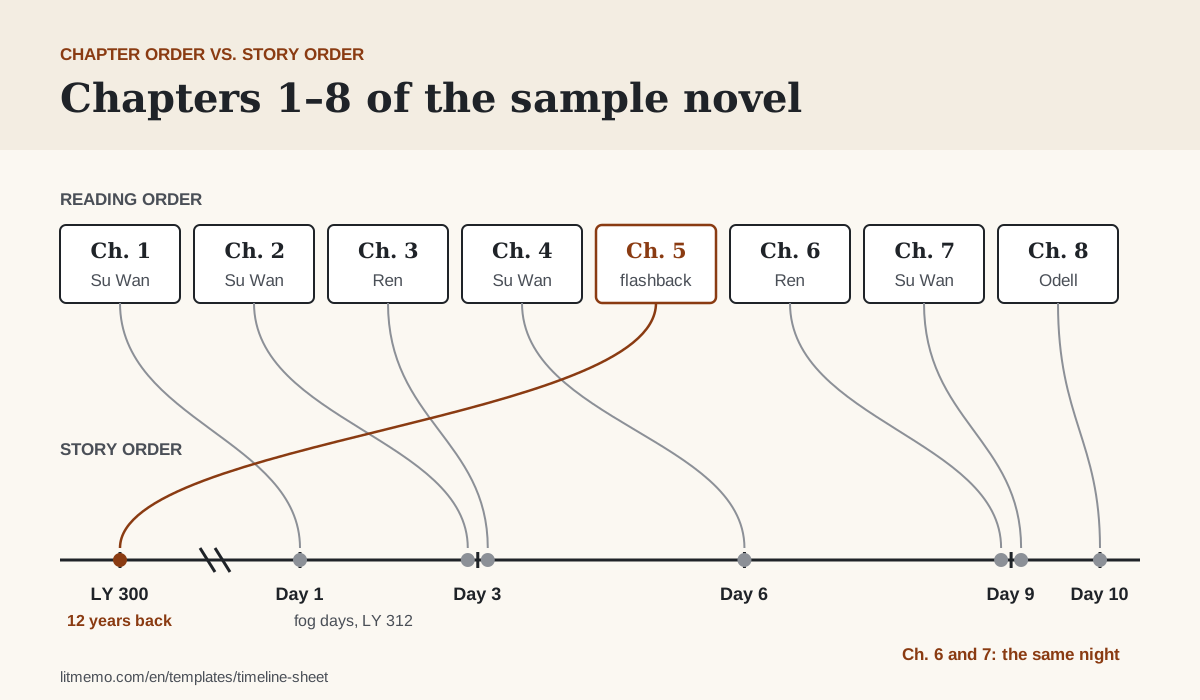
| Story time | When the chapter takes place. For a flashback, the date it flashes back to. | Ch. 5: LY 300 (flashback). Ch. 6: fog day 9. |
| Time since the previous chapter | How much story time passes between this chapter and the last one. It catches seasons that change too fast and POVs that drift apart. | Ch. 6: three days after ch. 4 (ch. 5 is a flashback and doesn't count). |
Plain-text version (copy & paste)
All four parts as plain text, ready to paste into Google Docs, Word, Notion, or Scrivener. Copy the event block once per event, or turn it into a table with one column per field.
■ Event timeline (copy this block for each event)
Event:
When (story time):
Chapter:
Track (main plot / subplot / character / backstory):
Characters present:
Place:
What it changes:


■ Anchors: the dates that can't move
Anchor event | Date | Why it can't move
1.
2.
3.
4.
5.


■ Character age grid
Character | Born | Age at anchor 1 | Age at anchor 2 | Age at anchor 3


■ Chapter order
Ch. | POV | Story time | Time since previous chapter
1.
2.
3.
Story order vs. chapter order
A novel has two orders: the order things happen, and the order the reader learns about them. In a straight chronological book they match. Once you add a flashback, a prologue set years later, or a second point of view that runs a few days behind, they don't, and that's where timeline errors come from.
Keep the event timeline in story order and the chapter-order sheet in reading order. Check facts against the first (how old was she, how many days had passed) and pacing against the second (how long since the reader last saw Ren). The diagram shows the first eight chapters of the sample novel in both orders.
A dual timeline novel is the same idea at a larger scale: two event timelines, decades apart, braided into one chapter order. The guide to managing a novel's timeline has a section on planning one.
Character timeline template: the age grid
Ages are the timeline error readers catch most easily, because they do the arithmetic for you. The grid fixes it once: one row per character, the year they were born, and their age at each anchor event.
Fill it for every character who appears at two different points in time: in a flashback and in the present, or in book one and book three. Add a column for each anchor, and mark deaths, so nobody shows up at a feast two years after their funeral.
For a full character timeline (a life, not just ages), add rows to the event timeline with that character's name as the track: born, apprenticed, married, the defining past event from their character sheet.
Book timeline for a series
For a series, keep one timeline for the whole world and give each book a track. Note where each book starts and ends, and how much time passes between them. Book two opening "a year later" is a decision you'll want to find again in book four.
The series bible template holds everything else a series has to keep straight; the timeline is the part of it that deals with dates.
Invented calendars and relative dates
Fantasy and science fiction rarely use our calendar, and you don't need to invent a full one before you start. Pick one anchor as day zero, write every other event relative to it ("Day 0 + 14," "three years before the Purge"), and convert to your world's calendar later.
If you do have a calendar, write its rules on your worldbuilding sheet: how years are counted, the names of the months, how long a week is. The sample novel counts Lamp Years from the founding of the city and numbers the forty fog days instead of naming them.
How precise to be
Track time to the smallest unit the plot depends on, and no smaller.
- Thrillers, heists, and chases: hours. Note when each scene starts and how long the journey between them takes.
- Mysteries: days, plus hours on the night of the crime. Alibis depend on them.
- Romance and most contemporary fiction: days and weeks. Watch the season and the days of the week.
- Fantasy quests: days of travel. Your worldbuilding sheet's travel times are the rule.
- Family sagas and multigenerational novels: years. The age grid does most of the work.
Timeline, outline, story bible: what goes where
The outline says what happens in each chapter and why. The timeline says when each event happens, who was there, and what happened at the same moment elsewhere. The story bible holds the facts that don't change with time: names, places, rules. Plan chapters in the novel outline template and use this sheet to check them.
In LitMemo, the timeline has a track for each thread, laid out side by side so events that happen at the same moment line up. Each event can be linked to its characters, places, and chapters, events can be reordered by dragging, and time labels take your own calendar. In a world with several books, the timeline belongs to the world, so a sequel adds to the same one.
How to fill in this template
Most timeline mistakes come from keeping time in your head: a character who is 30 in chapter 2 and 32 in chapter 20 with only a month in between, a three-day journey that takes one night, a subplot that's a week behind the main plot when they meet. Writing every event down with a date takes the guessing out.
Start with the anchors: the five to eight events whose dates can't move. Then add the main plot's events in story order, each with a date relative to an anchor. Add subplots and backstory on their own tracks. When two tracks share a date, read across: that's what everyone is doing at the same moment.
Fill the character age grid for anyone who appears at two points in time, and the chapter-order sheet once you've drafted a few chapters. The chapter-order sheet is where flashbacks, POV switches, and time skips become visible.
Update it as you write, not afterward. When a chapter adds an event or changes a date, change the row before you move on. A timeline that's a week out of date is worse than none, because you'll trust it.
Fill the template in four steps
Set the anchors
List the five to eight events with fixed dates (a war, a holiday, the story's first day) and what depends on each.
Add events in story order
One row per event with its date, chapter, track, the characters present, the place, and what it changes.
Fill the age grid
Year of birth for each character who appears at two different times, and their age at every anchor.
Map chapters to story time
List chapters in reading order with their story dates. Check flashbacks, POV switches, and the time between chapters.
Better together
Work it straight into your story
This template maps to these LitMemo features — fill it in online and everything auto-links:
Want to write it better? Start with these
Frequently asked questions
What should a story timeline include?
How do I lay out a timeline for a story with flashbacks?
How do I make a timeline for a dual timeline novel?
What about a fantasy world with no fixed calendar?
How do I spot timing conflicts between plot threads?
How precise should the dates be?
Can I use it in Google Sheets or Scrivener?
Or fill it in online — build the timeline right here
Start without signing up, then keep each event next to its characters, places and chapters