
Worldbuilding Template
A free worldbuilding template in two parts: a 26-field world sheet for the rules your whole story obeys, and an entry table for each place, faction, people, or object in it. Every field has a worked fantasy example. Copy and paste it, or download it as PDF, Word, or Excel.
Create a setting card — no sign-upA worldbuilding template is the page you check when the draft asks a question about your world: how far is the capital, who can arrest whom, what does bread cost, what can magic do. This one has 26 fields in eight groups (geography, history, politics, daily life, economy, magic, religion, and language), with the seven to settle before chapter one marked with a star. Each field comes with an example from one invented fantasy world, a fog-bound port called Mist-Veil City. Below the fields: add-on fields for fantasy, science fiction, and historical settings, 40 worldbuilding questions by category for when a field isn't enough to get you going, and a magic system worksheet.
Or fill it in online, right in LitMemo.
Create a setting card — no sign-upTemplate preview
The entry table, filled in for one place
| Field | Example |
|---|---|
| Name | Mist-Veil City |
| Type | Place (port city) |
| Description | A port built into sea cliffs, in fog most of the autumn. Ships come in by lighthouse, not by sight |
| History | Founded by pirate captains about three hundred years ago; taken by the crown as a border fortress |
| Rules | The gates close at dark. No open flame in the fog (fire draws the mist beasts) |
| Connections | Su Wan's home; seat of the Lighthouse Keepers' Guild; hunted by the mist beasts |
Printable blank version
Print the PDF to fill in by hand, or type into the Word or Excel version. Each has the 26-field world sheet, the entry table, the fantasy, science fiction, and historical add-on fields, and the 40 questions by category. The Excel file also opens in Google Sheets and Numbers.
Or fill it in online, right in LitMemo.
Create a setting card — no sign-upField guide
The preview table above holds individual things: one row per place, guild, artifact, or people. The 26 fields below are the world itself, the decisions every row has to obey. They're grouped by the questions readers notice (how far is it, who's in charge, what does bread cost, what can magic do), and each one is filled in for Mist-Veil City. The seven marked with ★ in the copy-paste version are the ones to settle before you start drafting.
Geography & nature
| Field | What to write | Example |
|---|---|---|
| Size of the stage | How much of the world the story touches: one city, a kingdom, a continent, several planets. Everything else scales from this. | One coastal kingdom, three cities, five days' ride from end to end. |
| Climate & seasons | The weather the characters live under and how the year is divided. It decides clothing, harvests, and when armies can march. | Wet and cold. A fog season of forty days each autumn, a short dry summer, storms in between. |
| Terrain & travel | Mountains, rivers, coasts, roads, and how long it takes to cross them with the means available. Travel time is the rule plots break most often. | Cliff coast, one river inland. By road, five days between the port and the capital; by boat, two, when the fog allows. |
| Resources | What the land gives and what it lacks. Scarcity is where conflict comes from. | Fish, salt, whale oil. Almost no timber, so every ship is bought from the south. |
History
| Field | What to write | Example |
|---|---|---|
| Origin event | The event the current order dates itself from. It sets the calendar and the founding myth. | The Lighting of the First Lighthouse, year 0: the pirate captains agreed to guide ships instead of wrecking them. |
| The most recent upheaval | The last thing that changed who holds power. Old enough that the world has settled, recent enough that people remember it. | The Purge, twelve years ago: the crown broke the old cliff houses, House Su among them. |
| The history nobody tells | What the official version leaves out. Your secrets and your antagonist's motives come from here. | The first lighthouse keepers went on wrecking ships for another sixty years. The guild's founding charter is a forgery. |
Politics & power
| Field | What to write | Example |
|---|---|---|
| Form of rule | Who decides, and how they got the right to. Monarchy, council, guild oligarchy, occupation. | A crown in the capital. In the port cities, the Lighthouse Keepers' Guild rules everything that touches the sea. |
| Law & punishment | What is illegal that matters to the plot, and what happens to people who are caught. Pick three laws the story will run into. | Lighting an open fire in the fog: branding. Sheltering a purged house: death. Smuggling: a fine the guild collects. |
| Military & policing | Who carries weapons legally, who they answer to, and how often ordinary people see them. | A city guard under the crown. Guild couriers carry blades on the docks by custom, not by law. |
| The powerful and the opposition | The two or three people or factions at the top, and who wants them gone. Your political conflict in one row. | Captain Ren runs the guard for the crown. The guild masters tolerate him. The survivors of the purged houses do not. |
Society & daily life
| Field | What to write | Example |
|---|---|---|
| Rank & class | The layers people are sorted into and how visible the sorting is. Can someone move between them? | Crown families, guild members, dock workers, the purged. A guild badge moves you up one layer; nothing moves you out of the last one. |
| Family & marriage | What a household looks like, who inherits, what marriage is for. Inheritance rules drive more plots than magic does. | Houses pass to the eldest child, son or daughter. Guild rank is never inherited. |
| Food, clothing, housing | What an ordinary person eats, wears, and sleeps in. Three details here make a scene feel lived in. | Salt fish and barley. Oiled wool. Stone houses cut into the cliff, one room per family, shared stairs. |
| Education & literacy | Who can read, who teaches, and what counts as educated. It decides whether a letter or a rumor moves the plot. | Guild members read; most dock families don't. The guild school takes one child per family. |
Economy & technology
| Field | What to write | Example |
|---|---|---|
| Currency & the price of bread | What money is called and what one common thing costs. One anchor price lets you improvise every other number consistently. | Silver marks and copper bits. A loaf of barley bread costs two bits; a courier earns thirty bits a day. |
| Main industries & trade | What the place makes, what it imports, and who it trades with. Trade routes are where strangers come from. | Salt and whale oil out, timber and grain in. Everything goes through the guild's harbor. |
| Level of technology | The most advanced tool in daily life, and what's missing. Write it down so you don't invent a printing press in chapter 20. | Sailing ships, oil lamps, hand-set type in the capital only. No gunpowder. |
Magic & powers
| Field | What to write | Example |
|---|---|---|
| What it can do | The effects that exist, stated as limits: the most a practitioner can achieve. Write the ceiling before the wonder. | Sound-sight: a few people can map a space by its echo, out to the size of a large room. Nothing else counts as magic here. |
| Cost & limits | What using it takes away, and what it can't do under any circumstances. A power without a cost flattens every fight. | Headaches that worsen with use; the old practitioners are half deaf. Useless in wind or rain. |
| Who has it & how society treats them | Is it inherited, learned, or bought? Are its users feared, hired, or hunted? | Born with it, about one in ten thousand, mostly in the old cliff houses. The guild hires them quietly; the crown keeps a list. |
Religion & belief
| Field | What to write | Example |
|---|---|---|
| What is worshipped & what it asks | The gods or forces people pray to, and the one or two rules the faith puts on daily life. | The Keeper, saint of the first lighthouse. The faith asks two things: keep a lamp lit at night, and never let a ship wreck unaided. |
| Religion's distance from power | Whether the faith runs the state, advises it, ignores it, or opposes it. It sets what a priest can do in a scene. | The guild is the church. The crown tolerates it because the ships keep arriving. |
Language & names
| Field | What to write | Example |
|---|---|---|
| Languages & the common tongue | How many languages are in play and which one the story is told in. Decide whether foreigners are understood. | One coastal tongue; the southern traders speak their own. Guild couriers learn enough of both to haggle. |
| Rules for personal names | The pattern names follow: family name first, a single name, patronymics. Decide once and every new character will sound like they belong. | Old families put the house name first (Su Wan). Everyone else has one name plus a trade (Ren the Captain). |
| The sound of place names | What the map sounds like: hard consonants, compound words, saints' names. Two or three examples keep future names consistent. | Plain descriptive compounds: Mist-Veil City, Saltreach, the Lamp Stairs. |
Plain-text version (copy & paste)
The 26 fields as plain text, ready to paste into Google Docs, Word, Notion, Scrivener, or a series bible. The seven to settle before chapter one are marked with ★. The genre add-on fields are at the end; delete the genres you don't need.
■ Geography & nature
★ Size of the stage:
Climate & seasons:
★ Terrain & travel:
Resources:

■ History
Origin event:
★ The most recent upheaval:
The history nobody tells:

■ Politics & power
★ Form of rule:
Law & punishment:
Military & policing:
The powerful and the opposition:

■ Society & daily life
Rank & class:
Family & marriage:
Food, clothing, housing:
Education & literacy:

■ Economy & technology
★ Currency & the price of bread:
Main industries & trade:
★ Level of technology:

■ Magic & powers
★ What it can do:
Cost & limits:
Who has it & how society treats them:

■ Religion & belief
What is worshipped & what it asks:
Religion's distance from power:

■ Language & names
Languages & the common tongue:
Rules for personal names:
The sound of place names:


■ Add-on fields (keep the ones your genre needs)

Fantasy
Peoples & species:
Creatures & monsters:
Calendar & timekeeping:
Gods: do they act?:
Magic's history:
The map in travel days:

Science fiction
Travel time between worlds or stations:
Communication delay:
What is automated, and who lost their job to it:
Who owns the air, water, or power:
Technology that is banned, and why:

Historical or contemporary
What you changed from the real record:
Real events happening in the background:
Words and objects that don't exist yet:
Your sources for prices, laws, and travel:
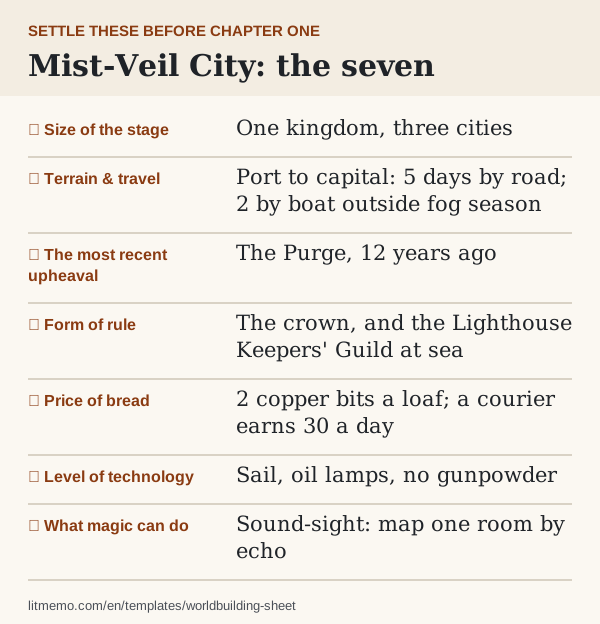
The seven fields to settle before chapter one
Size of the stage, terrain and travel, the most recent upheaval, form of rule, the price of bread, level of technology, and what magic can do. These are the seven a reader will catch you contradicting in the first fifty pages. The other nineteen can wait until a scene needs them.
Fill them in this order. The size of the stage tells you how far apart things are. Travel time tells you how fast news and armies move. The last upheaval tells you who is angry, and the form of rule tells you who can do something about it. The price of bread and the level of technology fix what daily life looks like. What magic can do, written as a ceiling, tells you what your climax can't rely on.
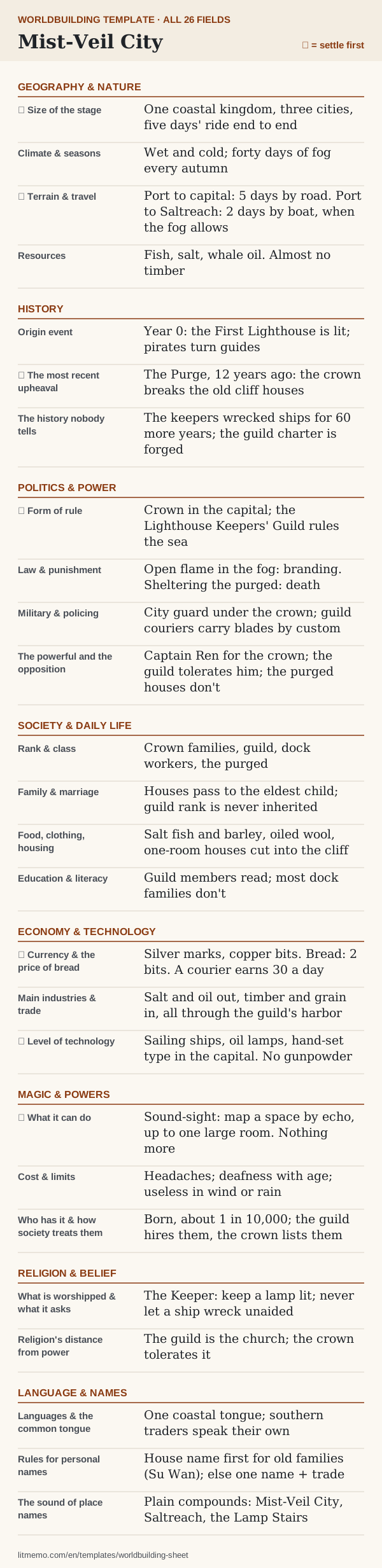
The whole world sheet, filled in
Here are all 26 fields for Mist-Veil City, condensed to a line or two each, with the seven to settle first starred. Most answers are a single sentence. A world sheet you can read in two minutes is one you'll actually check mid-draft.
Worldbuilding questions by category
When a field stays blank, answer one of these instead. They are grouped the same way as the sheet, five per group, and each one is worded to produce something a scene can use. The full set is also in the downloads.
Geography & nature:
- What does a traveler see in the first hour after arriving?
- Which route does everyone take, and what happens to people who take the other one?
- What season is it in chapter one, and what will the next season make impossible?
- What does the land run out of first in a bad year?
- Where is the one place nobody goes, and why?
History:
- What happened a lifetime ago that old people still argue about?
- Who wrote the official history, and what did they gain from it?
- Which holiday, monument, or curse word comes from the last war?
- What would your antagonist say really happened?
- What does everyone believe about the founding that isn't true?
Politics & power:
- Who can have someone arrested, and who can get them released?
- What is legal here that a reader would expect to be banned, or the other way around?
- Who wants the current ruler gone, and what stops them today?
- How long does an order from the top take to reach a street corner?
- Who collects taxes, and what happens to people who can't pay?
Society & daily life:
- What does a working family eat on an ordinary night?
- What would get your protagonist thrown out of a respectable house?
- Who may marry whom, and who breaks that rule anyway?
- At what age is someone treated as an adult?
- How do strangers greet each other, and what counts as an insult?
Economy & technology:
- What does a day's wage buy?
- What gets smuggled, and who looks the other way?
- What does every household own one of, and what do only the rich own?
- How does news travel, and how fast?
- What breaks often, and who fixes it?
Magic & powers:
- What is the most a practitioner can do on their best day?
- What does it cost, and who pays when the user can't?
- What can magic never do, no matter who tries?
- How is it learned, and who controls the teaching?
- What would an ordinary person do if they saw it used in the street?
Religion & belief:
- What do people do at a birth, a wedding, and a death?
- What do people swear by?
- Who in the faith holds real power, and who only appears to?
- Which rule do most believers quietly break?
- What happens to people who don't believe?
Language & names:
- What do locals call the city, and what do outsiders call it?
- What does a name tell you about someone's family or class?
- Which words will your protagonist use that the reader won't know, and how will the reader learn them?
- Is there a language only some people speak, and who uses it to keep secrets?
- How do people address someone above or below them?
If you want the long version, the worldbuilding guide works through the same layers with a checklist for each one.
Fantasy worldbuilding template: the extra fields
The 26 fields work for any genre. A fantasy world needs six more, because fantasy readers check these hardest:
- Peoples and species: who lives here besides humans, and what each group wants from the others.
- Creatures and monsters: what is dangerous outside the walls, and how it shapes daily rules.
- Calendar and timekeeping: how years are counted and what the months or seasons are called. The timeline template takes it from there.
- Gods: whether they act in the world or are only worshipped. Decide before a miracle shows up in chapter 30.
- Magic's history: when it appeared, who controlled it, and the last time it went badly wrong.
- The map in travel days: distances between the places the story uses, in days by each way of traveling.
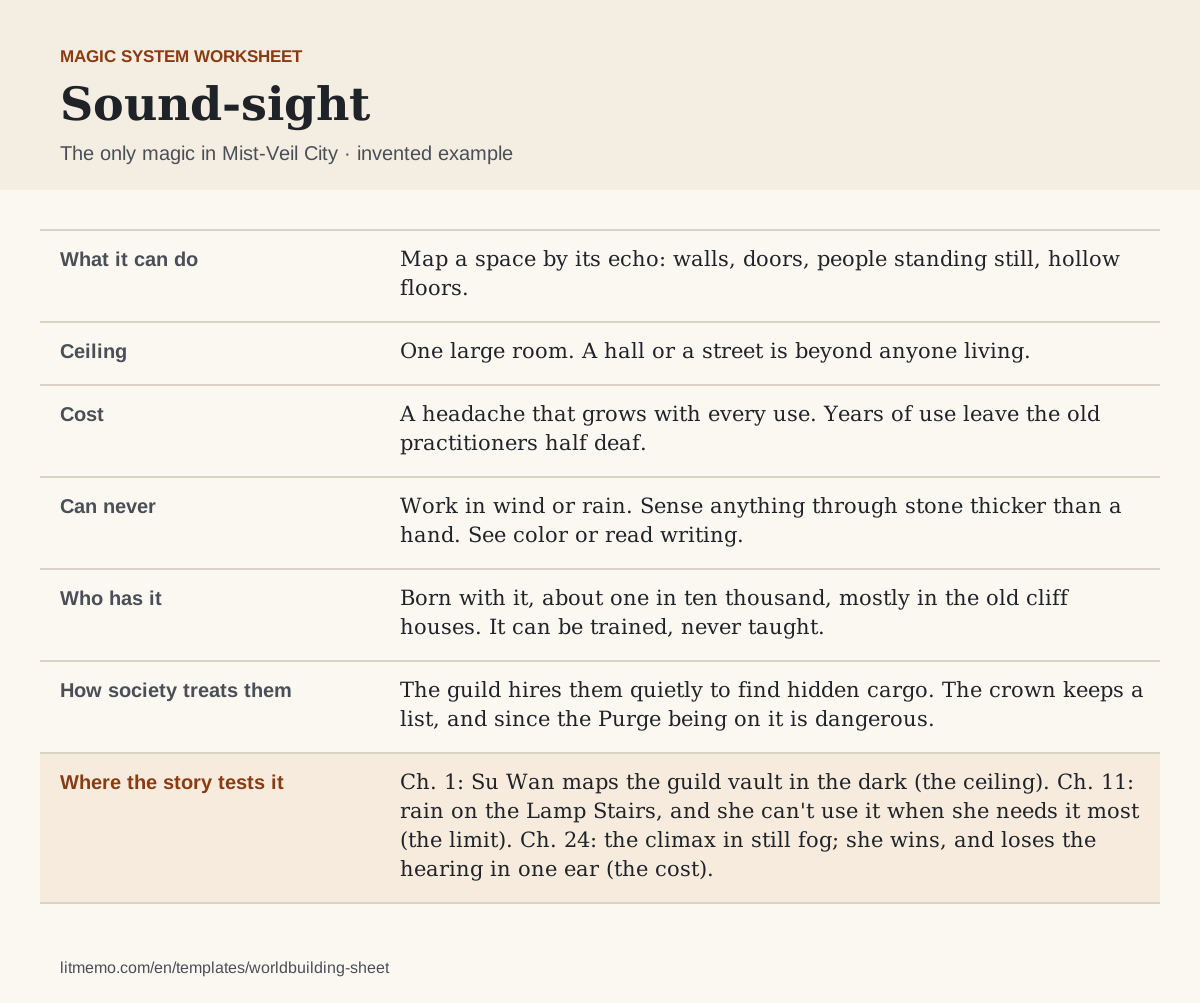
Magic gets its own worksheet, below. Write the cost and the limits before the wonder, and note the chapter where the story tests each limit. A limit the plot never tests is decoration. A limit the hero gets past exactly when it matters reads as cheating.
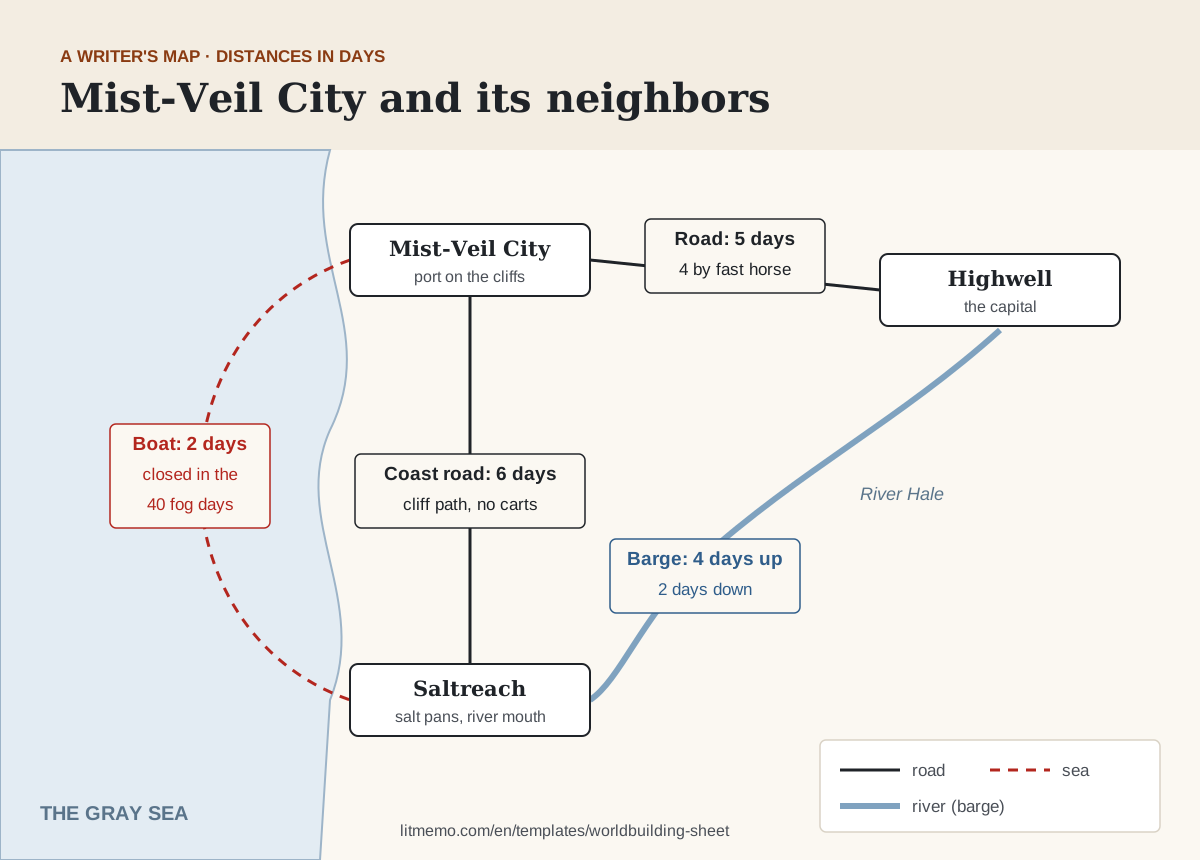
A map for writers: distances in days
You don't need a drawn map to write a fantasy novel. You need to know how long it takes to get from one place the story uses to another, by every way of traveling the world has, and what slows it down. That's what readers check.
Sketch the places as boxes and the routes as lines, and write the travel time on each line. Add the season or the weather that closes a route. In the example, the boat to Saltreach takes two days, but not during the forty days of fog, which is exactly when the plot needs someone there.
Science fiction, historical, contemporary: what to change
- Science fiction: rename Magic and powers to Technology and its limits and fill it the same way: what it can do, what it costs, who controls it. The cost-and-limits field is where hard and soft science fiction differ. Add travel time between worlds and communication delay under Terrain and travel.
- Historical: keep all eight groups, skip magic, and add what you changed from the record and the real events happening in the background. Historical readers check prices, titles, and travel times against what they know.
- Contemporary: skip magic and most of history. Record where your book departs from reality: the invented company, the renamed town, the police department that doesn't exist. Those are the details that drift out of sync later.
- Horror and fairy tale: history and religion carry the weight. The origin event and what is worshipped are often the same thing.
Where each answer goes
The 26 fields describe the world; the entry table holds the things in it. A rule from the sheet ("open flame in the fog: branding") goes into the Rules cell of the entries the story touches: the fog, the city, the guild. When a scene breaks a rule, you look it up in one place.
In LitMemo, those entries live in your world as setting cards with types you choose, each linked to the characters, chapters, and timeline events it involves. After you sign in, you can paste notes you already have and LitMemo extracts the places, groups, objects, and rules it finds into cards you can edit.
Worldbuilding template, questionnaire, or story bible?
A worldbuilding template is a fixed set of fields you fill once per world, like this one. A worldbuilding questionnaire is a long list of questions, often a hundred or more, that you answer to discover the world; the 40 questions above are a short one. A story bible holds the world and everything else a series has to keep straight: characters, timeline, and the facts each book established. Start with the template, and move it into a series bible when book two begins.
If you're prepping a tabletop campaign rather than a novel, the needs are different: players will go where the story didn't plan to. See the post on building a TRPG campaign world.
How to fill in this template
Worldbuilding notes usually fail in one of two ways. Either they never get written, and you decide how far the capital is every time a character travels there, or they get written in six places and stop agreeing with each other. A single sheet fixes both: the decision is made once, and there is one place to check it.
Fill the seven starred fields before you draft. They're the ones the first chapters lean on: distances, who rules, what things cost, what technology exists, and what magic can do. Leave the rest blank until a scene asks. A blank field is a note to yourself; a field filled with something you don't believe yet turns into a rule you'll break later.
Write rules as limits. "Magic can map a room by echo, nothing more" is more useful than a paragraph on how wondrous it is, because the limit is what you'll check in chapter 25. The same goes for laws, travel, and money: write the number or the line people can't cross.
Then use the entry table for individual things. Each place, faction, people, or object gets one row: what it is, what happened to it, the rules that apply to it, and what it connects to. Start with the three or four the first act uses; the table grows as the draft does.
Fill the template in four steps
Fill the seven starred fields
Size of the stage, travel, the last upheaval, form of rule, the price of bread, technology, and what magic can do. These are enough to start drafting.
Write each rule as a limit
For laws, travel, money, and magic, write the number or the line nobody can cross. Those are what you'll check mid-draft.
Add entries for what the first act uses
One row per place, faction, people, or object, with its history, its rules, and what it connects to.
Fill the rest when a scene asks
When the draft raises a question the sheet can't answer, answer it there first, then write the scene.
Better together
Work it straight into your story
This template maps to these LitMemo features — fill it in online and everything auto-links:
Want to write it better? Start with these
Frequently asked questions
What should a worldbuilding template include?
How much worldbuilding do I need before I start writing?
Is there a fantasy version?
How rigidly should I fix the rules of a magic system?
Does it work for science fiction or a real-world setting?
Can I use it for a D&D campaign?
Can I download the template?
I wrote a lot of worldbuilding I never used. Was it wasted?
Or fill it in online — make the setting card right here
Start without signing up, then link the setting to characters and chapters